To complete the Nora GO Download Windows, MacOS, or Linux setup on these computers, you must have the correct URL or source. It’s hard to find this online anymore. You cannot download the application from the Google Play Store or the App Store on computers anymore. The developer removed the Installation Setup Guides from their website pages.
But there is a source that provides the URL needed to install the Nora GO Player on each computer operating system. The URLs for the download are provided further down if you would rather skip this reading and start the download process now.
Some TV Players and Web TV Players are covered further down and can be used as Nora GO alternatives.
NOTE: Do Not click/select the Home link that takes you to the CracklePop page. That service does not support Nora GO. You will find where to register for the NoraGo trial or subscription further down.

What Is Nora GO TV Player
Setplex developed Nora Go, a free middleware application. The IPTV service provider designed this to help stream, organize, and manage TV/VOD content. The application itself doesn’t come with preloaded content. Once it’s installed, you can’t watch anything online until you take the next step to register for the IPTV service trial or subscription.
The IPTV service delivers all the streaming TV/VOD content to the TV Player, so you can watch TV online. NoraGO can be installed on any compatible device, which includes Windows, MacOS, and Linux computers. Not only will you be provided with the Nora GO download URL for Windows, but also the URL for MacOS and Linux computers.
Official SetPlex Website / Nora GO Developer
Setplex is the official Nora GO website and developer of the TV player app. They Do Not deliver any streaming TV/VOD content. Only the IPTV service provider delivers the content.
> Nora GO is a Setplex product. This video is an independent review and is not affiliated with, sponsored by, or endorsed by Setplex.
> For official website/information, visit https://setplex.com
How to Download NoraGO TV Player on PC, Mac & Linux Computers?
Basic Nora GO Download Windows, Mac & Linux Steps:
- Click the red or blue button for your device’s operating system below
- From your browser installer, drag and drop the file onto your desktop
- Double-click the Nora GO exe. file to open and follow what’s presented on-screen to download and install NoraGO
- Once the TV Player is installed, enter the activation/login credentials from the IPTV service provider when registering for the trial or subscription. This would be the Provider ID, Username, Password, or Device PIN Codes
- Once the login and activation of the TV Player take place, you now have access to all the streaming content

You must have a Mac, Linux, or Windows operating system X64 for the application to work properly.


Download URLs for Linux X64…
RPM (Red Hat, CentOS, Fedora, …)
AppImage (any system, portable)
Where to Get NoraGO TV/VOD Subscription or Trial
There are 3 recommended IPTV service providers where you can go to register for the Nora GO trial or subscription. It’s always a good idea to have more than one provider in your basket. This way, you can make the switch if needed without having to spend time searching for another provider.
You can get the Nora GO Windows download URL and activation/login credentials from either provider below…
3 IPTV Service Providers for Nora GO
1. Tesler Streaming for Nora GO
Nora GO Alternatives
3 Apps in 1 Service
If you are searching for a Nora GO TV player alternative but would like to stick with a very similar layout design, features, and interface, there are some applications available. Just like NoraGO, you will need an IPTV service subscription or trial that provides the activation/login credentials. With that, you pretty much get the same streaming TV/VOD content delivered. You won’t lose a thing and may even gain more.
Your search for the Nora GO Download Windows URL now becomes the SO Player, LUX Player, or XPlay Download Windows URL. The apps are easy to install on Windows and Mac computers, but require more steps for other compatible devices such as the Firestick, Fire TV, Fire Cube, and NVIDIA Shield.
The EPG (Electronic Program Guide) is also included, and you’ll find it easy to navigate through any of these TV Player apps, the same as with Nora GO.
It’s best to install the TV Player app before entering the trial or paying for the subscription. Make sure the app installs without an issue first.
Alternate XPlay & SO Player Download URLs
NOTE: You may not be able to copy/paste the following URL (in green) on this website and need to write it down. Simply enter the URL in your web browser on your Windows PC to download and install.
XPlay Download Windows URL: https://bit.ly/xplayhdapk
SO Player for Windows/Mac Download URL: Read ‘SOPlayer for PC Windows, Mac: Download, Install, BlueStacks‘
The following IPTV services support Nora GO, XPlay, and SO Player apps:
Register for the XPlay or SO Player trial/subscription for either service below…
1. Tesla — XPlay or Nora GO
2. TotalGo — Nora GO Subscription
20% Off Promo Code: U6SYCNYZ
Web TV Players for Windows, Mac & Linux Computers
The following IPTV service is CracklePop TV and does not support Nora GO. They support different TV player apps.
There are a couple of Web TV Players that open inside a web browser to watch streaming TV/VOD content. However, this is not for any of the services mentioned previously to get a trial or subscription. This requires a different subscription service called CracklePop TV.
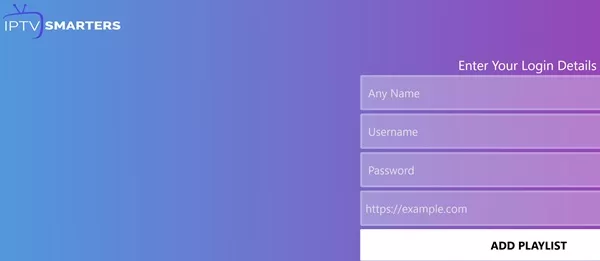
Here are two Web TV Players (Use either one or test both):
WebTV Player 1 | Web TV Player 2
This is not free; registering for the trial or subscription is needed to get the activation/login credentials for access to all the streaming TV/VOD content. Click the link below for CracklePop TV…
Get a Trial or Subscription Here | Read the Review Here
You can use either the Web TV Player in your travels with any computer you want to watch your favorites. Just log in to the app to get access. CracklePop TV will email the Username, Password, and Server/Portal URL.
Summary
This Nora GO Download Windows setup is indeed possible when following the instructions above. The app can also be installed on macOS and Linux computers using the URL provided. Some NoraGO alternatives, such as XPlay, LUX Player, and SOPlay IPTV services, were provided that are extremely similar to Nora GO and have similar IPTV services.
The Web TV Player app is another alternative that doesn’t require any downloading; it opens inside the web browser.

Just some guys with years of experience helping to find the best of the web TV/VOD entertainment for those looking to save and enjoy watching their favorites at home, on the go, or from far away places. Watch what you want, when you want, whenever you want without the likes of traditional TV.
We don’t claim to be the best. Instead, we strive to become better!
CracklePop TV Team